
HH98 Deposit & Withdrawal Guide – Everything You Need to Know
Managing your funds is simple when you understand the correct HH98 deposit and withdrawal process. Whether you want to add balance to your account or request a withdrawal, knowing the available options and steps can help you complete transactions smoothly.
This guide explains everything about HH98 deposits and withdrawals, including payment methods, transaction steps, common issues, and useful safety tips for Pakistani users.
How to Make a Deposit on HH98
Adding funds to your HH98 account is a quick process that allows you to access different features available on the platform. Before making a deposit, make sure you are logged into your account and have a supported payment method ready.
Step-by-Step HH98 Deposit Process
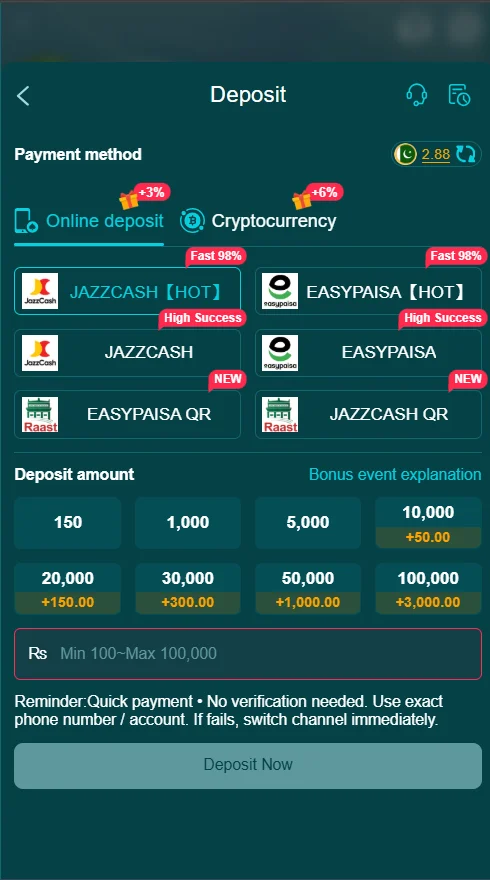
Follow these simple steps to add balance:
- Open the HH98.pk and log in to your account.
- Go to the Deposit section.
- Select your preferred payment method.
- Enter the amount you want to add.
- Confirm your payment details.
- Complete the transaction.
- Wait for the balance to update in your account.
Always check your entered details carefully before confirming the payment to avoid delays.
Available Payment Methods for HH98 Users
HH98 users in Pakistan usually prefer convenient digital payment options because they are fast and easy to use. Popular local methods may include:
- Mobile wallet payments
- Bank transfer options
- Other supported online payment services
Before completing a transaction, check the payment section inside your account to view the currently available options.
Minimum and Maximum Deposit Limits
Before adding funds to your HH98 account, it is helpful to understand the deposit limits and requirements. These details allow users to choose the right amount and complete their transactions without issues.
| Deposit Details | Limit |
|---|---|
| Minimum Deposit Amount | PKR 100 |
| Maximum Deposit Amount | PKR 100,000 |
| Daily Deposit Limit | Check inside the HH98 app |
| Monthly Deposit Limit | Check inside the HH98 app |
If your deposit amount does not meet the required limit, the transaction may not be completed successfully. Always check the latest deposit rules inside the HH98 app before adding funds, as limits may change over time.
Common HH98 Deposit Problems and Solutions
Sometimes users may experience delays or errors during deposits. Most issues can be fixed by checking payment details and following the correct process.
Deposit Not Showing in Account
If your balance does not update immediately, wait for a short time and check your transaction history. Make sure the payment was completed successfully.
Payment Failed During Deposit
Check your internet connection, payment details, and available balance before trying again.
Wrong Payment Information
Always confirm your account number or wallet details before submitting a payment to prevent transaction errors.
How to Withdraw Money from HH98
The HH98 withdrawal process is designed to be simple for users who want to transfer their available balance. To request a withdrawal, make sure your account information is correct and your payment details match your registered information.
Step-by-Step HH98 Withdrawal Process
Follow these steps to request a withdrawal:
- Log in to your HH98 account.
- Open the Withdrawal section.
- Select your preferred withdrawal method.
- Enter the amount you want to withdraw.
- Confirm your account details.
- Submit your withdrawal request.
- Wait for the transaction to be processed.
Processing times may vary depending on the selected payment method and account verification requirements.
Common HH98 Withdrawal Problems and Solutions
Withdrawal issues can happen due to incorrect details, verification requirements, or processing delays.
Withdrawal Request Pending
Some transactions may require additional processing time. Check your withdrawal status from your account section.
Withdrawal Details Incorrect
Make sure your payment information is accurate and matches your registered account details.
Withdrawal Not Received
If your withdrawal has been approved but not received, check with your payment provider or contact support for assistance.
Minimum Withdrawal Limit
Before making a withdrawal request, it is important to understand the limits set by HH98. These requirements help users choose the correct withdrawal amount and avoid transaction issues.
| Withdrawal Details | Limit |
|---|---|
| Minimum Withdrawal Amount | PKR 500 |
| Maximum Withdrawal Amount | PKR 100,000 |
| Daily Withdrawal Limit | Check inside the HH98 app |
| Monthly Withdrawal Limit | Check inside the HH98 app |
If your balance is below the minimum withdrawal amount, you need to increase your available balance before submitting a request. Always review the latest withdrawal policy inside the app for updated limits.
Tips for Safe HH98 Deposit and Withdrawal
Following good payment practices helps keep your transactions secure.
- Always verify payment details before confirming.
- Use your own registered payment account.
- Avoid sharing account information with others.
- Keep transaction records for reference.
- Use a stable internet connection during payments.
- Check transaction status after completing payments.
- Contact support if you notice unusual activity.
Manage Your HH98 Transactions Easily
Understanding the deposit and withdrawal process makes it easier to manage your HH98 account. By following the correct steps and using secure payment practices, users can complete transactions with fewer issues. Always review available payment options, check your details carefully, and keep your account information updated for a smoother experience.
Frequently Asked Questions
How can I deposit money on HH98?
You can deposit funds by logging into your account, opening the deposit section, selecting a payment method, and completing the transaction.
How long does an HH98 withdrawal take?
Processing time depends on the selected payment method and account verification requirements.
Why is my HH98 deposit pending?
A deposit may be delayed due to network issues, payment processing time, or incomplete transaction details.
Can I withdraw using my mobile wallet?
Available withdrawal methods depend on the options provided inside your HH98 account.
What should I do if my HH98 payment fails?
Check your payment details, internet connection, and try again. If the problem continues, contact support.